JavaScript Concepts
What is Node.js?
Node.js is an open-source JS runtime that allows you to execute JavaScript code on the server side. It’s built on Chrome's V8 JavaScript engine.
Runtime?
The environment where JavaScript code is executed. It could be
On the server
In the browser
On a small watch
V8 engine?
The V8 engine is an open-source JavaScript engine developed by Google. It is used to execute JavaScript code in various environments, most notably in the Google Chrome web browser.
Mozilla has their own JS engine - SpiderMonkey
Safari - JavaScriptCore
Installing Node.js:
Build from source
Using a package manager (brew, chocolat)
Using nvm
If you’re on windows, download git bash at the very least
Starting a Node.js project:
To initialize a Node.js project locally,
- Run the following command -
npm init -y
- Exploring package.json

- Writing some code
let firstName = "Harkirat Singh"
console.log(firstName)
- Run the code
node index.js
- Add a
scriptinpackage.json
  "scripts": {
    "start": "node index.js"
  },
- Run
npm run start
npm
The full form of NPM is Node Package Manager.
It is a package manager for JavaScript, primarily used for managing libraries and dependencies in Node.js projects. NPM allows developers to easily install, update, and manage packages of reusable code.
Internal Package:
Node.js provides you some packages out of the box. Some common ones include
fs - Filesystem
path - Path related functions
http - Create HTTP Servers (we’ll discuss this tomorrow)
External packages
These are packages written and maintained by other people. You just use their work in your project.
For example
Express
chalk
package-lock.json
The package-lock.json records the exact versions of all dependencies and their dependencies (sub-dependencies) that are installed at the time when npm install was run.
Q. Is it necessary to run npm init -y in Visual Studio Code when creating a folder or starting a new project?
Ans:
what npm init -y does:
Instantly creates a
package.jsonfile with default values.This file tracks your project’s:
Name, version, and metadata
Installed dependencies (like Express)
Module type (CommonJS or ES module)
Scripts (like
startortest)
Introduction to JS:
JavaScript is a lightweight, high-level programming language used to make web pages interactive. It runs in the browser for frontend tasks like form validation, animations, and dynamic content. With environments like Node.js, JavaScript can also run on the backend, allowing full-stack development using one language.
JavaScript is used both on the frontend and the backend. Some functions need to be defined and executed on the backend because they can't be done in the browser
For example:
Working with the file system using fs. If JavaScript running in the browser could read local files, it would create serious security issues, as developers or users could access sensitive data directly. That's why the browser does not allow direct file system access.
Originally, JavaScript only ran in the browser and couldn't run on the backend like Python or Rust. Node.js solved this problem by allowing JavaScript to run outside the browser, on the server side.
Features:
Javascript has the following -
1. Interpreted
JavaScript is an interpreted language, meaning it's executed line-by-line at runtime by the JavaScript engine in the browser or server environment, rather than being compiled into machine code beforehand.

Upsides -
- There is one less step to do before running your code
Downsides -
Performance Overhead:
More prone to runtime errors
2. Dynamically Typed
Variables in JavaScript are not bound to a specific data type. Types are determined at runtime and can change as the program executes
C++ Code (won’t compile)
#include <iostream>

int main() {
  int a = 1;
  a = "hello";
  a = true;
}
JS Code (will compile)
var a = 1;
a = "harkirat";
a = true;

console.log(a)
3. Single threaded
JavaScript executes code in a single-threaded environment, meaning it processes one task at a time. We will dive deeper into this next week.


4. Garbage collected
JavaScript automatically manages memory allocation and deallocation through garbage collection, which helps prevent memory leaks by automatically reclaiming memory used by objects no longer in use.

Conclusion
Is JS a good language?
Yes and no. It is beginner friendly, but has a lot of performance overhead. Bun is trying to solve for a lot of this, but there’s a long way to go before JS can compete with languages like C++/Rust
Setting up environment:
You can try all the code on github code space and also on vscode.
Create folder on github→ Login to Github. Go to codespace. create codespace. vs code enviornment will open.
Create an account on replit.
Keep your browser console open for testing locally
Open your browser (Chrome, Firefox, Edge, etc.) → Right-click anywhere on the page and select: → "Inspect" → Then go to the "Console" tab → Type JavaScript code directly in the console
Download node js and Make sure to check “Add to PATH” during installation
Normally, JavaScript runs inside web browsers (like Chrome). Node.js lets you run JavaScript on your computer/server – like Python or Java.
How to Run a JavaScript File in VS Code:
Open VS Code
Go to
File > Open Folderand select your project folderCreate a
.jsfile (e.g.,app.js)Go to Terminal → New terminal
To run, in the terminal, type: node filename.js
Create folder → create js file → type code → view tab → terminal → go to inside folder where you kept all files → run file on terminal using node filename.js
Need some setting:
- view→ command palatte→ add dev container configuration files.→ show all defination → node js → rebuild now- > it will restart again with configuration.
Save all code and files to github:
click on source control icon → click on “+” icon to add files which you want to commit → enter msg →click commit.
click on three dots behind changes tab → click on push → so your data will push to github
After pushing all code you can download through zip file.
- once you done with coding you have to delete that machine from codespace
Syntax of Javascript:
1. Variables
Variables are used to store data. In JavaScript, you declare variables using var, let, or const.

❓ Why is var not used much now?
var has function scope, not block scope — this can cause unexpected behavior.
It allows redeclaration, which can lead to bugs.
let and const are safer with block scope and better control.
Local variable:
-when we passed any parameter they act as local variable. -they will be inside function/block of code.
Global Variable:
-they will be within the code. or outside the block.
Example:
function sum(x,y){
s=x+y;
}
console.log(x); // it wont run because you print x ouside the block.
2. Data types
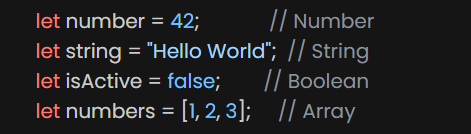
Primitive (call by value): -string, Number, Boolean, Null, Undefined, symbol,BigInt
Non Primitive (Call by reference): -Array, objects, Function
3. Operators
4. Functions
// Function declaration function
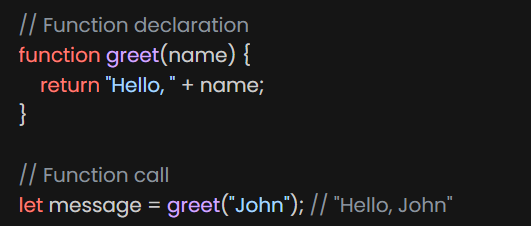
-Block of code that performs a specific task, can be invoked whenever needed.
Function Defination:
function function_name(){
//do some code
}
Function Call:
function_name();
Pass the input:
function function_name(par1,par2){
//parameter
//do some code
}
function_name("df"); //arguments
Note:-when we pass input while defining function we called it - parameter
-when we pass input while calling function we called it- arguments
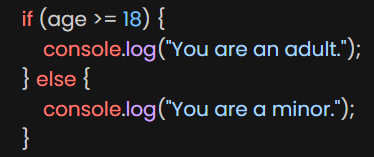
5. If/Else
6. Loops
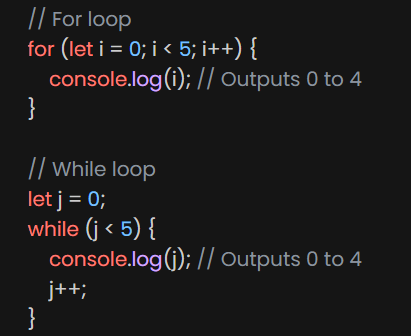
7. Memory:
stack -Primitive- when u declare variable u get copy of it.
Heap - Non primitive - when u declare variable u get change in original value.
8.String
Index- when we take index whiile slicing it wont take
last index. -slice can take - which will stat from end
trim is used for to remove extra spaces
strings in javascript is immutable.
//\n: to the next line
//\t: to tab space
a)Temperal literals
- a way to have embedded expressions in string.
b)string interpolation- To create string by doing substitution of placeholder
Note: MDN web docs - to know more about string
//\n: to the next line
//\t: to tab space
Non-primitive Data Types:
Objects
An object in JavaScript is a collection of key-value pairs, where each key is a string and each value can be any valid JavaScript data type, including another object.
eg.
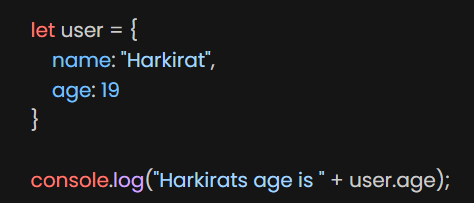
-we can declare object by two ways: literal & constructor
-We can change objects values -we can freeze object
Arrays
Arrays let you group data together
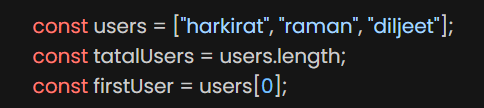
its object type -collection of items
they are mutable -Arrays are important data structures used in web development to store different types of data.
Arrays are a better approach for storing multiple values compared to creating multiple variables
Arrays in JavaScript can hold multiple values or items of different types.
Arrays in JavaScript can be accessed by the length property.
Arrays in JavaScript allow accessing values based on index.
Arrays in JavaScript can be accessed by index and values can be changed.
Arrays in JavaScript can be accessed using indexes starting from zero.
Arrays in JavaScript have methods that allow us to change the array in place or return a new array.
Arrays in JavaScript can be used to store and manipulate sets of values.
Concatenating arrays in JavaScript using the concat() method.
Deleting and adding elements in an array using indexes
Arrays in JavaScript can be manipulated using the splice method.
Removing and replacing elements in an array
Methods in array:
push() - to add items at end
pop() - to delete item from end
toString() - converts array to string
unshift - it will ad item at the start but all indecise will change
shift - to remove value from array= we dont need to keep value.
join = to merge all in one string
slice & splice= in slice it will take some portion but not end index in splice it will remove taken portion
trim = to remove spaces from start and end to check prototype go to google do inspect->console pass array and call it u will get prototype
push and concat problem -
you can’t push second array in first array
because that whole array will count as one element
so to add two array we will use concat. alternatively we can use spread operator or flat operator.
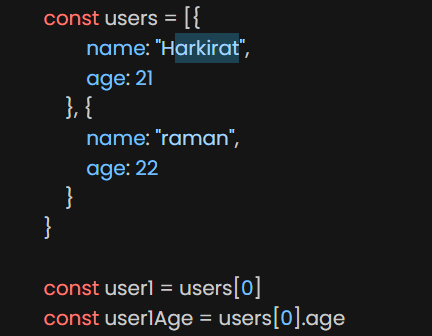
Array of Objects
We can have more complex objects, for example an array of objects
Object of object
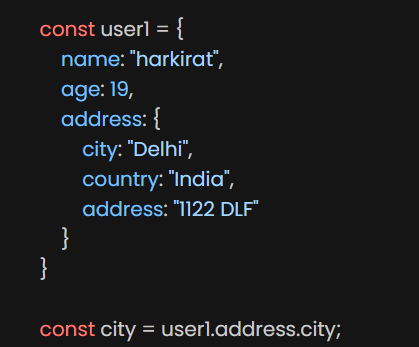
We can have an even more complex object (object of objects)
eg.
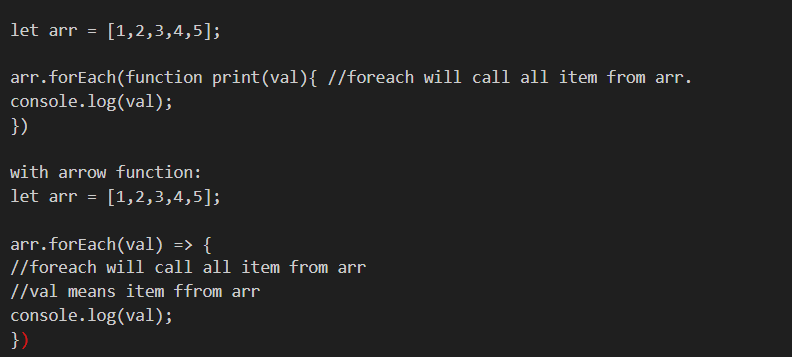
ForEach loop in Arrays:
arr.forEach(callBackFunction)
callback function: here it is a function to execute for each element in the array
a callback is a function passed as an argument to another function.
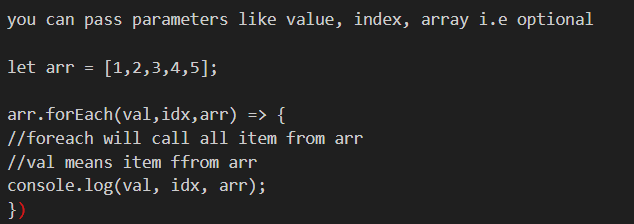
Syntax: arr.forEach((val) => { console.log(val); })
note: if we associate function with object or data structure then it turns out into method
Example:
to convert into uppercase:
console.log(val.toUpperCase());
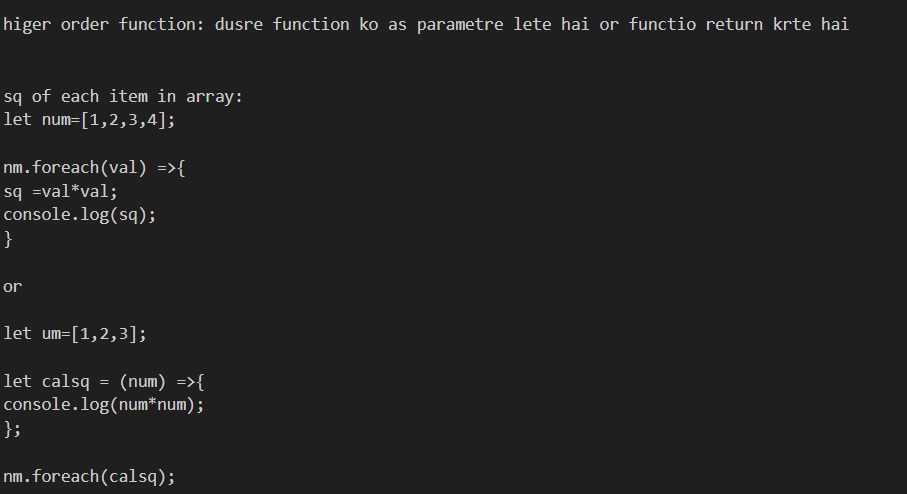
Methods:
- Map:
- create a new array wih the result of some operation. the value its callback returns are usd to form new array
Syntax: arr.map(callbackFnx(val,index,array))
ex.
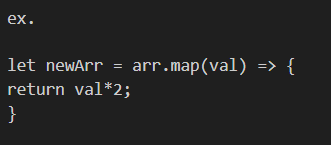
you can store value of array in array. using value in array you can create new aray.
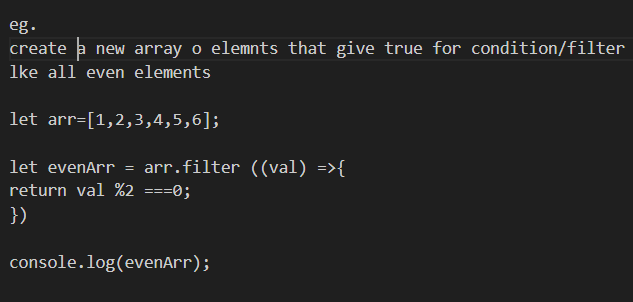
- Filter:
- filtered value will stored in new array
eg.
- Reduce:
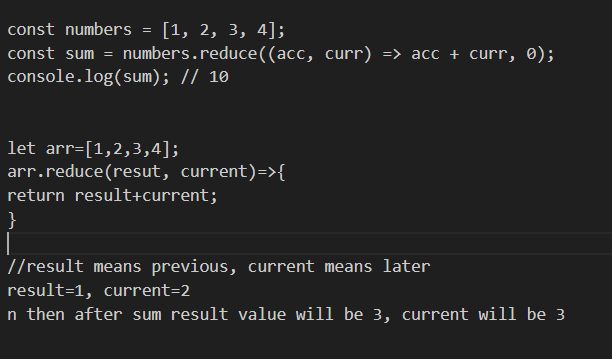
- is used to reduce an array to a single value by applying a function to each element